
HLO App Geofencing Error 2027: Location Match Failed का समाधान | 4 Practical Steps
Digital Census 2027 • Houselisting & Housing Census • Mobile App Support
HLO App Geofencing / Location Error – Census 2027
Digital Census 2027 के पहले चरण में Houselisting & Housing Census (HLO) के लिए mobile applications का उपयोग किया जा रहा है। Official Census website पर Census 2027 Houselist और Houselist Training apps की जानकारी उपलब्ध है।
अगर HLO App में Location Match Failed, location mismatch या location-related error दिखाई दे रहा है, तो सबसे पहले phone की location settings, GPS accuracy, internet connection और assigned area की स्थिति check करनी चाहिए।
⚠️ Important: यह article सामान्य technical troubleshooting guide है। किसी भी location/EB-related issue में गलत location से data submit करने के बजाय अपने Supervisor / Charge Officer के official instructions follow करें।
Office of the Registrar General & Census Commissioner, India की official website पर Census 2027 के HLO notifications और mobile app privacy information उपलब्ध हैं।
Government information, technology और Census 2027 की useful updates एक जगह पाएं।
1. HLO App में Geofencing / Location Error क्यों आता है?
HLO जैसे location-based field applications में location-related error कई कारणों से दिखाई दे सकता है। उदाहरण के लिए phone की location accuracy कम होना, GPS signal कमजोर होना, building के अंदर होना, mobile data समस्या या app/device की temporary synchronization समस्या।
- Location Accuracy कम होना
- GPS Signal कमजोर होना
- Building या covered area में होना
- Mobile Data / Internet connectivity समस्या
- App का temporary technical issue
- Assigned area और current location में mismatch
2. HLO App Location Error: Quick Troubleshooting Table
| Problem | Possible Reason | What to Check |
|---|---|---|
| Location Match Failed | GPS / location mismatch | Location ON करें और खुले area में दोबारा check करें |
| Location Out of Bounds | Current location assigned area से match नहीं कर रही | अपना assigned area और Supervisor instructions verify करें |
| GPS Weak / Unavailable | Indoor / weak GPS signal | खुले स्थान पर जाकर कुछ समय wait करें |
| Data Not Syncing | Internet / server connectivity | Internet connection check करके official process follow करें |
3. Geofencing / Location Error ठीक करने के 4 Practical Steps
Phone Settings में Location को ON रखें। यदि device में Location Accuracy का option उपलब्ध है, तो उसे enable रखें।
बहुत ऊंची इमारत, बंद कमरे या ऐसी जगह जहां GPS signal कमजोर हो, वहां location inaccurate हो सकती है। संभव हो तो खुले स्थान पर जाकर location दोबारा check करें।
Mobile Data / Wi-Fi connection उपलब्ध है या नहीं, check करें। इसके बाद HLO App को दोबारा खोलकर आवश्यक process follow करें।
अगर location सही होने के बावजूद assigned area से संबंधित error बना हुआ है, तो स्वयं location bypass करने की कोशिश न करें। अपने Supervisor / Charge Officer को error बताएं।
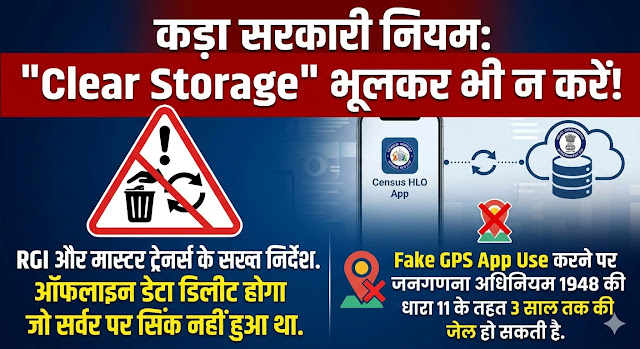
- Fake GPS या location spoofing tools का इस्तेमाल न करें।
- Assigned area से बाहर जाकर जबरन data submit करने की कोशिश न करें।
- बिना समझे app का data/storage clear न करें।
- Important unsynced field data delete करने वाला कोई step न लें।
- Unknown APK या unofficial HLO application install न करें।
4. HLO App Error के समय Supervisor को क्या बताएं?
अगर basic troubleshooting के बाद भी error बना हुआ है, तो Supervisor को केवल “App नहीं चल रही” बताने के बजाय नीचे की जानकारी देना ज्यादा उपयोगी रहेगा:
- Error message का exact text
- Error आने का समय
- Current location / field area
- Assigned EB / area details, जहां applicable हों
- Phone model और app version, यदि उपलब्ध हो
- Error का screenshot
5. Census 2027 HLO App के बारे में Official जानकारी
Office of the Registrar General & Census Commissioner, India की official website पर Census 2027 – Houselist और Census 2027 – Houselist Training apps का उल्लेख किया गया है। Official privacy policy के अनुसार Houselisting और Training apps से collected information का उपयोग लागू कानून और नियमों के अनुसार Government द्वारा किया जाता है।
Census 2027 के पहले चरण यानी Houselisting Operations (HLO) के लिए official Gazette notification भी जारी की गई है। पूरे देश के लिए HLO period 1 April 2026 से 30 September 2026 के बीच निर्धारित किया गया है, जबकि राज्य/UT के अनुसार actual field periods अलग हैं। :contentReference[oaicite:1]{index=1}
Census of India की official website पर HLO questionnaire और Census 2027 notifications भी उपलब्ध हैं।
6. HLO App Geofencing Error: FAQs
Q1. Location Match Failed आए तो सबसे पहले क्या करें?
Location ON करें, खुले स्थान पर जाकर GPS/location दोबारा check करें और internet connection verify करें।
Q2. Location Out of Bounds दिखाई दे तो क्या करें?
अपनी assigned field area/location verify करें। यदि आप सही area में हैं फिर भी error है, तो Supervisor/Charge Officer को inform करें।
Q3. क्या Fake GPS से Geofencing Error ठीक किया जा सकता है?
ऐसा नहीं करना चाहिए। Location-based government field application में official process और supervisor instructions का पालन करें।
Q4. GPS signal कमजोर हो तो क्या करें?
यदि संभव हो तो खुले स्थान पर जाएं, Location Accuracy check करें और कुछ समय बाद location फिर verify करें।
Q5. Error लगातार बना रहे तो?
Error का screenshot और जरूरी details लेकर अपने Supervisor/Charge Officer को report करें। बिना official instruction के app data या settings में बड़ा बदलाव न करें।
➤ Jangadna 2027: भवन निर्धारण कैसे करें? Census House की जानकारी
7. निष्कर्ष: Location सही रखें, Official Process Follow करें
HLO App में location-related error आने पर घबराने की जरूरत नहीं है। पहले phone की location, GPS accuracy, internet और current field location check करें। अगर समस्या बनी रहती है तो Supervisor / Charge Officer के official instructions follow करें।
Census 2027 से जुड़ी महत्वपूर्ण updates के लिए official sources को प्राथमिकता दें।
📢 यह HLO App troubleshooting guide अपने Training Group में Share करें
📲 WhatsApp पर Share करें1. Office of the Registrar General & Census Commissioner, India – Census 2027 official website
2. Census 2027 – Mobile App Privacy Policy
3. ORGI Gazette Notification – First Phase Houselisting Operations (HLO)
4. Houselisting and Housing Census Schedule 2027
Official source: censusindia.gov.in